How can I change my billing or shipping address on the B2B Portal?Updated 4 months ago
You can add in your new billing or shipping address via your portal profile page (click this link when logged in to the portal).
Click the pencil tool to edit your shipping or billing address. Enter your new address, and select "Save" to continue,
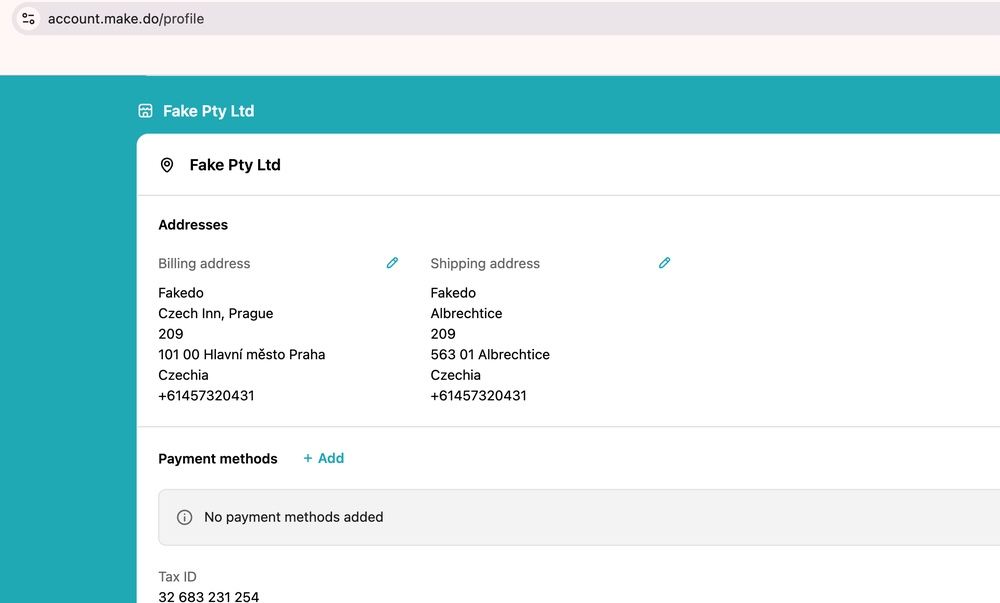
Your new shipping or billing address will then show up on your profile and at the checkout stage.
We recommend choosing a safe delivery location for orders where an authorised recipient is available to accept your delivery.
Please note that we are usually unable to modify your delivery address after an order has been submitted to our system. Please reach out to our team at [email protected] if you are having any trouble updating your shipping address and we'll be happy to help.